How should print and apply maintenance and changeover be planned?

Preventive maintenance and controlled changeover protect print quality, placement, uptime and the link between the active product and label.

Direct answer

Separate routine operator care from competent technical maintenance

Print and apply maintenance should combine approved cleaning, consumable inspection, mechanical checks, backups of controlled settings and planned replacement of wear items. Changeover should confirm the physical pack, label stock, ribbon, template, guides, sensors and applicator settings before release. Always follow the machine manufacturer's instructions and the site's isolation, guarding and competence procedures.

  • Use checklists matched to the actual machine configuration.
  • Do not use maintenance access as a production shortcut.
  • Record repeat faults and replaced parts.
  • Retain approved templates and parameter backups.
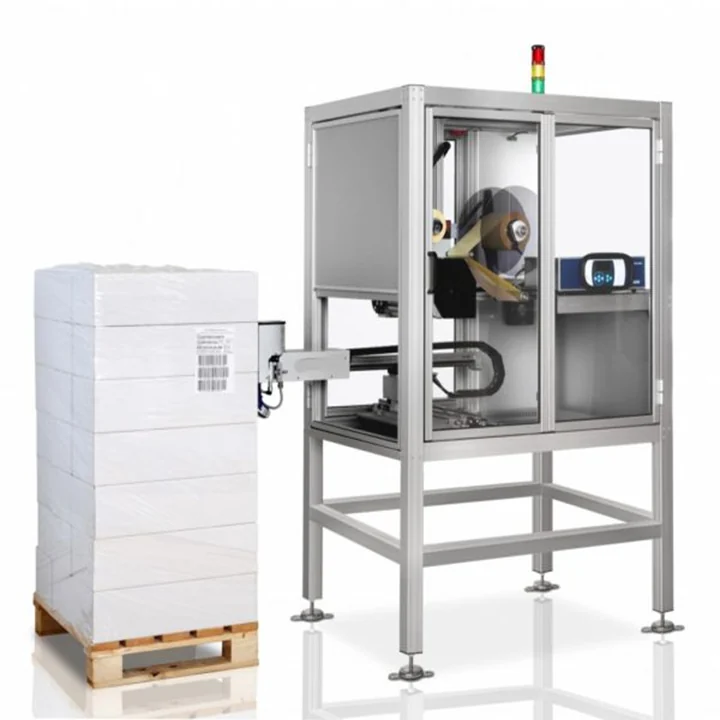
Industrial print and apply labeller requiring planned maintenance access

Maintenance layers

Routine operator checksMedia and ribbon condition, label path, print quality, pad or wipe surface, sensor cleanliness, fault display and obvious loose or damaged components.
Approved cleaningPrinthead, platen, peel edge, rollers, label sensors and applicator surfaces using the method and consumables specified for the equipment.
Planned mechanical inspectionFasteners, guides, bearings, cylinders or actuators, vacuum and air circuits, cables, guarding and alignment by competent personnel.
Controls and dataBackup of approved recipes and templates, user-access review, event logs, communications health and recovery tests.
Critical sparesItems selected from failure consequence, lead time, wear history and the installed configuration rather than a generic list alone.

A controlled changeover sequence

1. Clear the previous product and label

Remove or identify every pack, prepared label and production record from the previous job so the next format cannot inherit an ambiguous label state.

2. Load approved consumables

Confirm label stock, unwind direction, ribbon where applicable and the correct media path. Check that remaining labels from the old job cannot be mixed with the new roll.

3. Select and prove the format

Load the approved template or recipe, set guides and sensors, and verify that the physical product matches the active job.

4. Complete a first-off check

Inspect printed content, barcode, placement and any expected-data result using a representative product before unrestricted production resumes.

5. Release and record

Record the approved first-off sample or result where required and keep rejected or test labels separate from production stock.

Questions operators and buyers ask

How often should the printhead be cleaned?

Use the printer manufacturer's interval and method, adjusted for actual media, ribbon and dust conditions. Clean before poor quality becomes normal, but do not use unapproved solvents or abrasive materials that can damage the printhead.

What should be checked on a tamp pad?

Inspect the surface, ports, vacuum or air function, alignment, damage and contamination. A worn or adhesive-covered pad can change label holding, release and placement even when the printed label is correct.

What causes thermal-transfer ribbon wrinkles?

Possible causes include incorrect loading, uneven tension, media mismatch, damaged components, printhead pressure or alignment. Follow the print-engine procedure and test the approved ribbon/label combination rather than increasing heat without diagnosis.

Should label templates and recipes be backed up?

Yes. Keep controlled backups of approved templates, field mappings and machine recipes, together with the version used at acceptance. Access and restoration should be restricted so an obsolete file cannot silently return to production.

Which spares should be held?

The list depends on the installed printer, applicator, sensors, actuators and controls. Prioritise consumables and wear items whose failure stops production, then consider supplier lead time, installed quantity and the site's maintenance capability.

What should operator training cover?

Training should cover normal start-up, job selection, consumable loading, first-off checks, permitted cleaning, fault containment, authorised reprints and when to escalate. It should not encourage bypassing guards, interlocks or controlled procedures.
Related pages

Review the installed configuration

Send the machine configuration, consumables, format range and fault history so Lancing can help identify the relevant maintenance and spares scope.

Discuss support

Call nowContact us