How should a checkweigher feed a print and apply labeller?
Bind the correct accepted weight to the right case and printed label.
Keep the product record, approved artwork, printed label and physical pack connected through normal production, stops, reprints and recovery.
A printer-applicator may receive product, order, batch, destination, date, serial or pallet information from an ERP, WMS, database, scanner or PLC. The interface should identify the authoritative source for every field and the event that ties the record to the physical pack.
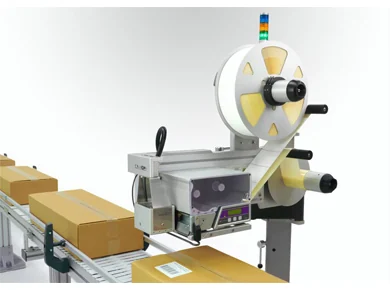
The exact architecture depends on the selected line controls and software, but the responsibility split should be agreed before coding or commissioning starts.
| ERP, WMS or database | Owns the approved business record and supplies the field values or key required for the label transaction. |
|---|---|
| Line PLC or controller | Associates the record with the detected pack, manages timing and decides whether the physical item may advance. |
| Print controller | Loads the approved template, maps the supplied fields, renders the label and reports print/media status. |
| Applicator controls | Manage label presentation and application motion and report home, cycle-complete and fault states. |
| Scanner or verifier | Checks the agreed property and returns the result while the pack can still be contained. |
| Operator procedure | Controls job selection, consumable changes, fault reset, reprint authority and the disposition of the affected pack. |
A label template contains more than visible artwork. It also defines fields, barcode construction, formatting rules and the relationship between supplied data and the printed result. A copied or locally edited template can therefore create a readable but incorrect label.
Manual selection can work on a simple controlled line, while automatic selection can reduce operator decisions on a high-SKU line. Either route needs a check that the active job matches the product at the applicator.
A print request, completed print and completed application are separate events. The recovery process should know which of those events occurred before another label is produced.
Do not allow a failed pack to merge back into normal flow while its expected record or label status is uncertain.
Determine whether a valid label is still in the printer path, on the applicator pad, partly applied or already on the pack.
Use a defined retry, reprint, relabel, quarantine or scrap decision rather than an unrestricted repeat command.
Record the final outcome where the customer process requires traceability and ensure the expected identifier has not been used on another pack.
Use representative products and production records. Prove the normal sequence first, then introduce deliberate exceptions one at a time.
| Correct product and record | Approved template, expected data, successful print/application and intended release. |
|---|---|
| Unknown product | No default or previous label is printed and the pack remains controlled. |
| Missing or delayed field | Timeout and recovery behave as defined without losing the physical pack identity. |
| Communications interruption | Queued records, prepared labels and pack order remain safe after reconnection. |
| Wrong readable data | Where expected-data comparison is required, the pack is contained even though the symbol decodes. |
| Authorised reprint | Existing label state is checked and the new print remains tied to the same confirmed pack. |
| Changeover | Previous templates, data and mechanical settings cannot remain active unnoticed. |
Use these answers to define the software and operating scope before quotation.
The project should name one authoritative source for each field and define how the physical pack is linked to that record. Ownership may sit in an ERP, WMS, database, PLC or another controlled system depending on the line.
Manual selection can be suitable for simple controlled lines, but the procedure should confirm the active product and approved template. Higher-SKU or higher-risk lines may benefit from automatic selection tied to the product record.
Use an approved version, controlled access, a clear change record and a production test with representative data. The active version should be identifiable during fault investigation and acceptance testing.
The line should use a defined timeout and hold, stop or containment response. It should not silently print default, previous or ambiguous data.
Keep the affected pack identity known, track whether a label was printed or applied, limit automatic retries and require an authorised reprint procedure that checks for an existing valid label.
Retain approved templates, field mapping, representative messages, normal and fault sequence results, reprint tests and the label/pack samples used for acceptance.
Use the data-control guide with the physical application and verification pages rather than treating software as a separate final-stage task.
Send the approved label, field list, example records, source-system description, product trigger, expected line sequence and required failed-pack response. This allows the interface boundary to be reviewed before the controls scope is fixed.
A template field called “weight” does not state whether the value is gross, net, stable, accepted or tied to the correct pack. A field called “pallet” does not establish its relationship to an ASN. Record field meaning, units, status and physical-unit association in the interface agreement.
Bind the correct accepted weight to the right case and printed label.
Keep the physical pallet, contents record and electronic despatch advice aligned.