Why do print and apply labels lift, wrinkle or miss the pack?

Application faults usually come from a mismatch between the label, pack surface, presentation and applicator condition rather than one isolated setting.

Direct answer

Start with the symptom, then separate media, pack and machine causes

Labels lift, wrinkle or miss the pack when the adhesive cannot make controlled contact, the product is not where the applicator expects it, the label is not presented consistently or the mechanical motion is worn or incorrectly set. Diagnose one variable at a time using the same label, pack and operating condition so an adjustment does not hide the original cause.

  • Quarantine affected packs before changing settings.
  • Record label batch, ribbon, product format and active recipe.
  • Inspect the label path and applicator pad before changing timing.
  • Repeat the check at minimum and maximum normal conditions.
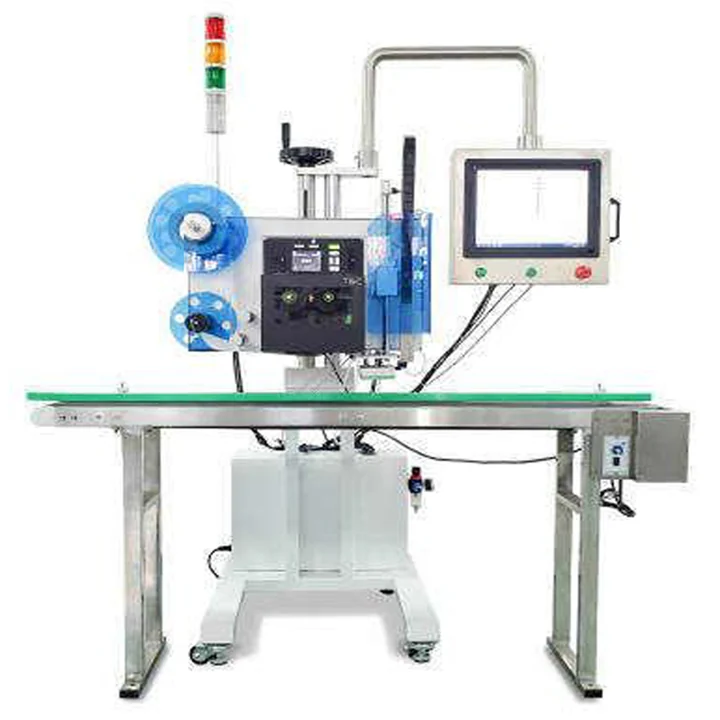
Compact print and apply applicator for troubleshooting label placement

Symptom-led troubleshooting

Label edge liftsCheck surface contamination, application temperature, adhesive suitability, corner radius, pressure and whether the label bridges a seam or loose film.
Label wrinklesCheck product movement during contact, wipe direction, pad flatness, label stiffness, pack curvature and whether one edge contacts too early.
Label remains on the padCheck vacuum or air control, pad contamination, label presentation, release timing, static and whether the pack was within the expected apply distance.
Label is skewedCheck product skew, guide position, sensor repeatability, applicator alignment, label presentation and conveyor speed changes.
Pack passes without a labelCheck product detection, job/data status, printer ready state, label-present confirmation, applicator interlocks and fault handling.
Barcode is unreadable after applicationCheck print quality, distortion, wrinkles, reflections, scanner geometry, quiet zones and whether the code is placed across a corner or damaged area.

A controlled diagnostic sequence

1. Contain the affected product

Keep failed and uncertain packs separate so a mechanical adjustment does not allow an unlabelled or mislabelled pack to continue.

2. Record the condition

Photograph the symptom and note the active job, product format, label batch, ribbon, temperature, speed and recent changeover or maintenance activity.

3. Inspect static conditions

Check the label path, peel edge, pad, guides, sensors, fasteners and pack surface before changing software delays or motion parameters.

4. Observe the complete cycle

Run slowly where the machine procedure allows and watch label presentation, product arrival, first contact, dwell, release and return. Follow site safety controls and never defeat guarding or interlocks.

5. Change one variable and retest

Keep the label and pack constant while testing one justified correction. Confirm the result at normal production speed and through a stop/restart sequence.

Questions buyers and operators ask

Why does the label wrinkle on only one carton size?

That format may present a different face angle, height, corner, stiffness or distance to the pad. Compare the datum, guides and applicator travel with a format that runs correctly rather than applying one timing value to every case.

Why do labels lift after cold storage?

The adhesive may not have developed sufficient initial contact before cooling, or condensation may have been present during application. Test the actual application temperature, dwell before storage and surface condition with the final label construction.

Why does placement skew increase at higher speed?

Product movement, slip, sensor timing and wipe contact can change with speed. The line should be tested at normal minimum and maximum rates using the smallest product gap and typical accumulation conditions.

Can a dirty applicator pad cause faults?

Yes. Adhesive, dust and damaged pad surfaces can affect label holding and release. Clean and inspect the pad only with the method approved for the machine and label system, then confirm vacuum or air functions before production.

Why is an occasional pack missed?

Intermittent misses often point to variable product presentation, marginal sensing, delayed data, label-present faults or an incomplete return before the next trigger. Review event logs and the smallest product gap rather than only repeated manual cycles.

When should operators stop adjusting the machine?

Stop when a safety device, guard, interlock, electrical fault, damaged applicator, uncontrolled motion or uncertain product identity is involved. Follow the site's isolation and escalation procedure and use competent technical support.
Related pages

Send the evidence from the fault

Provide photographs, a short cycle video, label and pack samples, active format information and a description of the failure frequency.

Discuss the fault

Call nowContact us