Barcode clarity
High-resolution printing for scannable barcode and QR labels.
Automatic barcode label printer applicator for applying GS1, QR, batch, date and product identification labels to moving cases, cartons and packs.
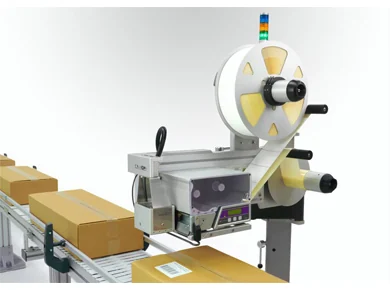
Configured around your label, pack format, line speed and data requirements.
High-resolution printing for scannable barcode and QR labels.
Sensors trigger print and application as each product moves through the line.
Configure the applicator to suit the required label face and product orientation.
Store label templates and variable fields for different SKUs.
Mounts to a conveyor or stand with practical adjustment and access.
Supports batch, lot, expiry, product and logistics data requirements.
Final specification depends on label stock, print format, throughput and integration requirements.
| Print resolution | 300 or 600 dpi options depending on print detail and barcode requirements. |
|---|---|
| Application method | Tamp, wipe, blow or hybrid applicator selected to match the pack movement. |
| Product types | Cases, cartons, trays, totes and other stable packs subject to trial. |
| Data source | Operator templates, database, scanner or control system integration. |
| Line controls | Sensors, rejects and PLC I/O options available where required. |
Use print and apply labelling where variable data, barcode quality and consistent placement are required.
Variable barcode labels for cartons and outer cases.
Batch, date, lot and product information on packaged goods.
Destination and carrier labels before warehouse release.
A typical Lancing print and apply project can include the machine, controls, sensors and integration support needed to fit the system into your process.
Send the details below and Lancing UK can advise on the best format.
Share your label size, pack size, apply face, data source and target speed for a practical configuration review.
These are related but different checks. A barcode can be readable yet contain the wrong record; it can contain the right record but be placed where the downstream scanner cannot see it.
| Presence check | Confirms that a label or mark is detected; it does not prove readability or data correctness. |
|---|---|
| Read check | Confirms that the scanner can decode the symbol under the tested conditions. |
| Data match | Compares the decoded data with the expected product, order or pallet record. |
| Quality grade | Requires a defined verification method, standard, test geometry and acceptance threshold. |
| Failure action | Defines stop, reject, quarantine, operator response and traceable recovery. |
Printheads, platen rollers, sensors and scanner windows need planned inspection and cleaning. A machine that passes an initial trial can lose margin as contamination, media variation or mechanical adjustment changes the result.
Confirm the approved template, media, ribbon, barcode record and placement setting before releasing production.
Monitor printer alarms, label-present status, scanner results and reject or stop events rather than relying only on visual checks.
Inspect printhead condition, media path, tamp pad or wipe edge, sensors, scanner window and the mechanical datum used for placement.
A simple read check proves readability only. Proving the correct data requires comparison with the expected record or an equivalent controlled validation step.
Position the check where it can inspect the finished applied label under representative presentation. The scanner geometry and pack movement should be trialled.
The line must have a defined response such as stop, reject or quarantine, plus a controlled recovery method that prevents duplicate or mismatched labels.
A handheld read can be useful, but it is not the same as a documented barcode quality grade or in-line verification under production conditions.
Print resolution, media, ribbon, printhead condition, artwork, quiet zones, contrast, label surface, placement, scanner angle and movement can all affect the result.
Use approved templates, controlled access and a clear link between the active job, the product identity and the expected data record.
A barcode no-read does not identify the root cause by itself. The trial should preserve enough evidence to distinguish an incorrect source record, the wrong template, poor print formation, unsuitable placement or scanner geometry.
| Source-data check | Compare the expected product, order or pallet record with the value supplied to the label job before printing. |
|---|---|
| Template check | Confirm the approved template version, field mapping, barcode type, encoded value and human-readable information. |
| Loose-label print check | Assess the printed label before application to isolate media, ribbon, printhead, heat, speed and artwork effects. |
| Applied-label check | Inspect the finished pack for skew, wrinkles, bridging, surface contamination, quiet-zone obstruction and movement through the scanner field. |
| Expected-data comparison | Where required, compare the decoded value with the record tied to that physical pack; a readable symbol can still contain the wrong data. |
| Formal quality result | If a grade is required, state the applicable method, test geometry, acceptance threshold and evidence to retain rather than treating a simple read as equivalent. |
Barcode performance depends on a controlled combination of data, template, resolution, media, print settings and final presentation. Changes to any one of these can invalidate an earlier sample result.
Deliberately test a missing record, media fault, poor print, missing label, no-read and readable-but-wrong value where the project requires data comparison. Confirm the affected pack remains identifiable and that the recovery process cannot silently apply a duplicate or stale label.
No. A reader can decode a well-printed but incorrect value. Where the process requires it, compare the decoded data with the expected pack record and contain a mismatch while the pack is still identifiable.
A reader confirms that a symbol can be decoded in that setup. A verifier assesses defined barcode-quality characteristics. The project should state which evidence is required rather than treating the terms as interchangeable.
Choose the resolution using the final barcode, text size, print area, label material and required line conditions. The existing Lancing range includes both options, but a real-label print and scan test should decide the configuration.
Post-application checking can detect wrinkles, damage, poor placement, missing labels or the wrong expected data—conditions that a printer-only check cannot prove.
Use a defined timeout and hold or stop response. The system should not print previous, default or ambiguous data to keep the line moving.
The code needs a clear, repeatable view without folds, seams, straps, reflections or edge damage. Confirm the final placement with the intended reader geometry.
The reader may decode the image while the receiving software rejects its data structure, identifier, field content or relationship to the shipment. Validate both the decoded information and the intended business record. Increasing print darkness will not resolve a data-rule mismatch.
Review the template, encoded syntax, data owner, available label area, printer rendering, scanner capability and receiving-system parser. Treat it as a controlled format change. Trial the longest normal record and the final applied label, rather than only changing the displayed barcode graphic.
Compare GS1-128, ITF-14 and 2D case barcodes before fixing the print engine. For per-pack measurement fields, use the checkweigher integration guide.