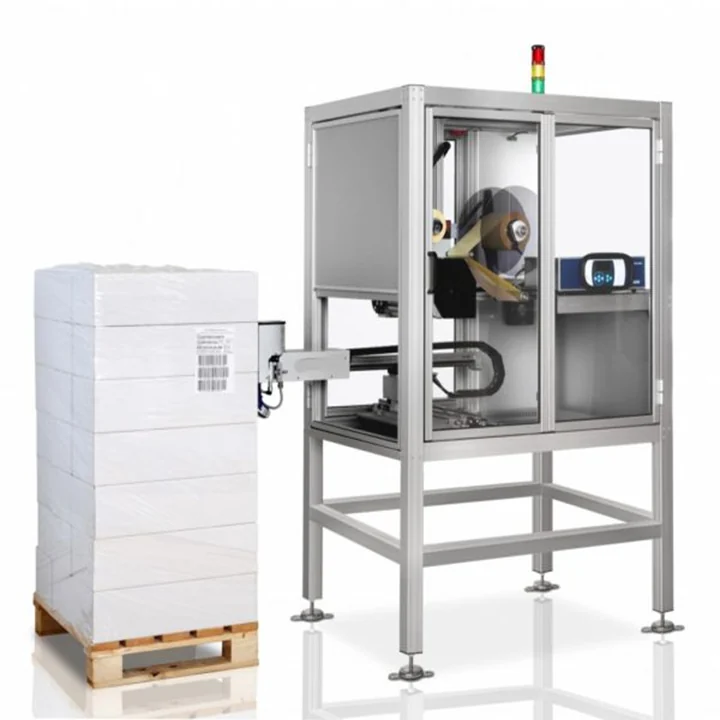
Print and apply integration checklist

A printer-applicator is rarely just a standalone machine. The best results come when data, sensors, product handling and operator access are considered together.

Guides

What this page helps you decide

A printer-applicator is rarely just a standalone machine. The best results come when data, sensors, product handling and operator access are considered together.

  • Clarify the label, barcode and data requirement before machine selection.
  • Choose the right applicator style for the pack movement and apply face.
  • Prepare better information for quotation, integration and installation.
Print and apply integration checklist

Specification points

These are the areas that usually decide whether a print and apply labeller runs smoothly on the line.

Data and control checklist

  • How does the label template get selected?
  • Where does variable data come from: ERP, WMS, PLC, scanner, weigh scale, database or operator input?
  • Is there a requirement to log prints, verify barcodes or reject unlabelled packs?

Mechanical checklist

  • Confirm conveyor height, product direction, product gap, available mounting space and guarding requirements.
  • Allow room for label roll changes, ribbon changes, cleaning, printhead access and maintenance.
  • Check whether the machine needs to be moved for washdown, cleaning or line changeover.

Commissioning checklist

  • Trial the label on the real pack surface and packaging material.
  • Confirm the fail-safe state for no-label, no-data or barcode scan failure.
  • Train operators on template selection, roll loading, fault recovery and cleaning.

Questions buyers ask

Quick answers for planning the right labelling configuration.

Can print and apply labellers connect to PLCs?

Yes, systems can be specified with I/O, sensors and line control connections.

Can the system use live production data?

Yes, many print and apply systems are configured around live data from a database, scanner, PLC or ERP/WMS.

What usually causes integration delays?

Missing data rules, unclear label templates, insufficient product spacing and limited access around the conveyor are common causes.

Need this matched to a real line?

Send label size, pack dimensions, apply position, line speed and data source. Lancing UK can help specify a practical print and apply format.

Interface acceptance

Test the normal sequence and every controlled exception

An interface is complete only when both the successful path and the recovery path are defined.

Product triggerCorrect timing, debouncing, missing-gap behaviour and response to an unexpected product.
Data requestMessage source, record key, acknowledgement, timeout, stale-data prevention and retry limit.
Print statusReady, busy, complete, media-out, ribbon-out, printhead and communications faults.
Application statusLabel present, applicator home, cycle complete, no-label and mechanical fault.
VerificationExpected record, decoded result, pass/fail timing and containment response.
RecoveryAuthorised operator action, controlled reprint, pack identity and prevention of duplicate application.
Controls responsibility

Write an interface responsibility matrix before software work starts

Names such as ERP, WMS, PLC and printer interface do not define who owns the decision. Record which system creates each value, which system validates it, which signal advances the physical pack and who is authorised to recover after an exception.

Product or pallet identityDefine the key that links the physical item to the expected record, how it is captured and how long it remains valid.
Variable dataList the source of every field, its format, mandatory/optional status, validation rule and the response when it is missing or late.
Template selectionDefine whether selection is automatic or operator-led, how the approved version is identified and how a wrong-job condition is blocked.
Print handshakeDocument request, acknowledgement, busy, complete and fault status, including timeout and retry behaviour.
Application handshakeDocument product trigger, label-present state, applicator-home state, cycle complete and mechanical fault response.
Inspection resultDefine the expected value, inspection method, result timing and the device or controller that decides pass, stop, reject or quarantine.
Reprint authorityState who may request a reprint, how the original pack is identified and how stale or duplicate labels are prevented.
Production recordAgree which events are retained, where they are stored and what evidence is required for troubleshooting or customer acceptance.

Commission the interfaces in a controlled order

Proving the normal sequence first is useful, but commissioning should then add one deliberate exception at a time so the failed event and recovery result can be attributed to the correct interface.

Prove one static record

Print the approved template with known data and confirm the physical label, encoded value and expected printer status.

Add physical product timing

Run representative packs at normal speed and gap, confirming trigger, application, home return and pack release.

Add live record selection

Use multiple products or pallet identities and prove the correct record remains attached to each physical item through stops and restarts.

Add inspection and containment

Introduce missing, unreadable and unexpected data conditions where applicable and confirm the affected pack is held or rejected as intended.

Prove authorised recovery

Complete a controlled reprint, reset and restart without losing pack identity or applying a stale label.

Information to freeze before site work

Changes to labels, data mapping or line sequence during commissioning can make earlier results invalid. Record the approved versions used for the test and identify any item that remains a site dependency.

Call nowContact us