How do print and apply labellers work?

A print and apply labeller combines on-demand label printing with controlled application to a product, carton, case, tote or pallet.

Direct answer

A print and apply labeller turns one production record into one applied label

A print and apply labeller detects the pack, selects the approved label template and variable data, prints the label, presents it to an applicator and places it on the intended surface. The controls then confirm the agreed status—such as cycle complete, label present or barcode result—before the pack is released or contained.

  • The source record must be tied to the physical pack.
  • The print engine produces fixed and variable label content.
  • The applicator method is selected around pack movement and label position.
  • The failed-pack response must be defined before commissioning.
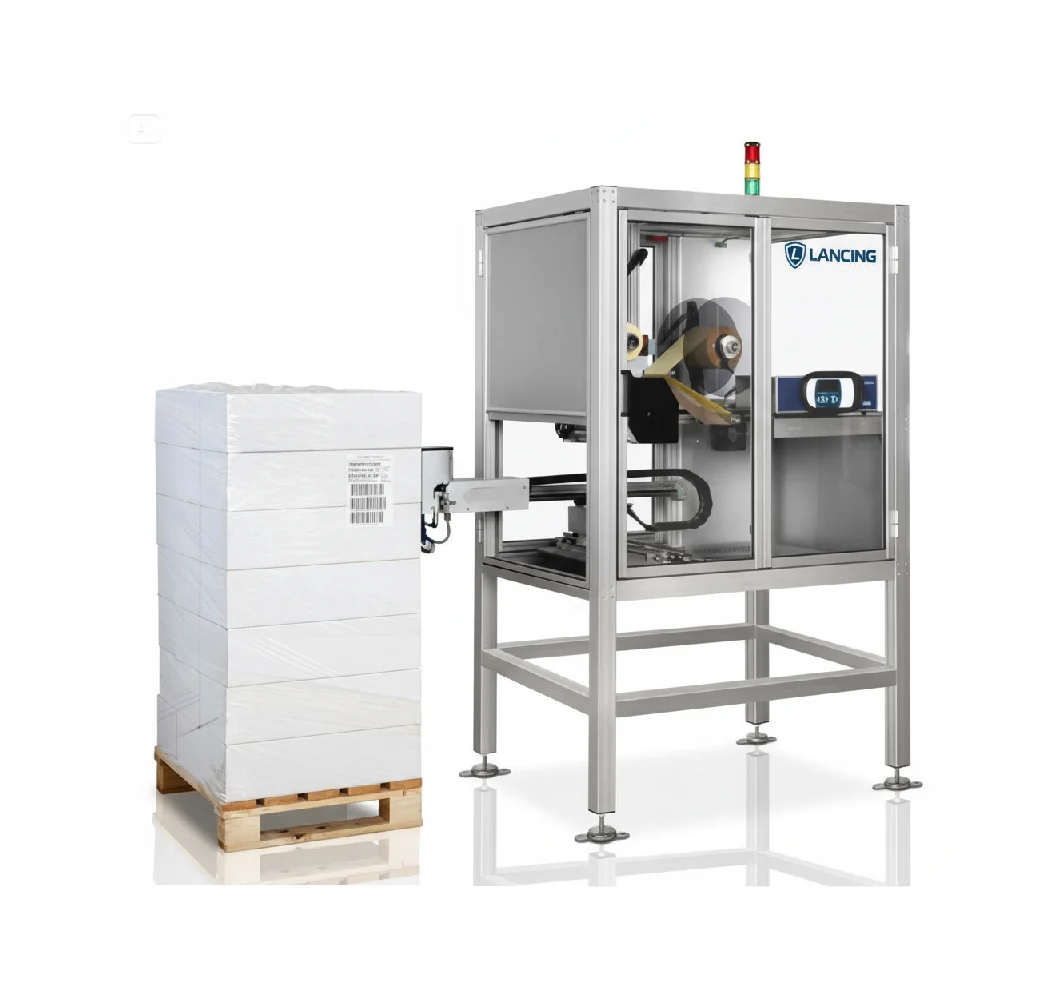
Industrial print and apply labelling machine

The operating sequence

The exact controls vary by project, but the process normally contains these linked events.

1. Detect and identify the pack

A sensor, scanner or line-control event confirms that a pack has reached the labelling station. The system must know which production record belongs to that pack before a variable label is requested.

2. Select the data and approved template

The ERP, WMS, database, PLC or operator selection supplies the required record. Fixed artwork and variable fields are combined only when mandatory data is present and the correct template version is active.

The print engine advances the media and creates the barcode, text and graphics. A label-present state should confirm that the label is ready for the applicator rather than assuming that a print command produced a usable label.

4. Apply the label

Tamp, wipe, blow or corner-wrap motion places the label on the required face. Pack position, surface condition, applicator travel and label dimensions all affect the mechanical sequence.

5. Check and release

The line may require cycle-complete confirmation, label presence, barcode decoding, expected-data comparison or formal verification. The chosen check must return a result while the affected pack can still be stopped or quarantined.

What each part of the system does

Print engineCreates the label from the approved template and supplied data using direct thermal or thermal-transfer printing.
Label stock and ribbonProvide the printable surface, adhesive and—where thermal transfer is used—the image-forming ribbon.
ApplicatorControls the motion that places the prepared label on the product, case or pallet.
Product sensor and conveyor interfaceEstablish pack timing, spacing and any stop, index or release sequence.
PLC, database or line controllerCoordinates product identity, data requests, machine status and exception handling.
Scanner or inspection deviceChecks the agreed property after printing or application and reports the result.

Questions buyers ask about the process

What is the difference between print and apply and apply-only labelling?

Print and apply creates the label at the point of use, which suits changing product, batch, order, destination or pallet information. Apply-only machinery dispenses pre-printed labels and can be simpler when every pack uses the same approved label. The correct choice depends on when the data becomes final and how often it changes.

Does the conveyor have to stop for labelling?

Not always. Wipe application normally uses controlled product movement, while tamp application may label a moving or indexed pack depending on the geometry and cycle. The decision must be proven with the real label, pack range, product gap and furthest application position.

Can every pack receive a different label?

Yes, provided the line can associate each physical pack with the correct record and the data is final before printing. The controls should prevent previous, duplicate or ambiguous labels being used after a stop, fault or communications interruption.

What should happen if a label is not presented or applied?

The machine should report the failed state and the line should keep the affected pack identifiable. Depending on the process, the pack may be stopped, rejected, quarantined or held for an authorised recovery step. An automatic reprint is unsafe if the original label state is unknown.

When is print and apply not the best option?

Print and apply may add unnecessary complexity when all labels are identical, product presentation is uncontrolled or the pack surface cannot accept a pressure-sensitive label reliably. A pre-printed applicator, direct product coding or a handling change may be more suitable after a representative trial.

What information should be sent before quotation?

Send final label artwork, label construction, pack dimensions, the application face, target output, conveyor video, data source, available space, utilities and the required response to print or inspection faults. These inputs allow the complete sequence to be scoped rather than only the printer.
Continue the specification

Discuss the real sequence

Lancing can review the label, pack presentation, data event and failed-pack response before a machine configuration is fixed.

Contact Lancing

Call nowContact us