Data source
Confirm whether label data comes from an operator template, scanner, ERP, database, weigh system or PLC trigger.
Warehouse labelling errors create relabelling, delays, missed scans and customer service issues. Print and apply systems can reduce manual points of failure.
Reduce warehouse labelling errors with automatic print and apply case, carton and pallet labels. This page is written for buyers comparing print and apply labelling machinery before speaking to a supplier.
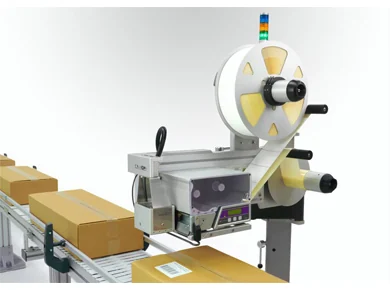
Use these points to compare systems and avoid specifying a labeller that cannot keep up with the real line conditions.
Confirm whether label data comes from an operator template, scanner, ERP, database, weigh system or PLC trigger.
Define the label face, edge distance, orientation and scan point before choosing tamp, wipe, blow or corner-wrap application.
Plan quiet zones, label stock, print resolution and verification so the code scans reliably after application.
Match print cycle, applicator movement and product spacing to the real throughput target rather than a best-case brochure speed.
Check conveyor height, available space, guarding, reject handling, sensors, I/O and operator access.
Compare manual labour, relabelling, dispatch errors and downtime against the cost of an automated printer-applicator.
A short practical brief allows the machine format, applicator movement and data handling to be narrowed down quickly.
These nearby pages help connect this search to product routes, application notes and quotation support.
Quick answers for buyers planning print and apply labelling automation.
Common causes include manual label selection, inconsistent placement, weak scan checks, changing data and unsuitable label stock.
It prints the correct label at the right point in the process and applies it automatically to the case, carton or pallet.
Confirm label size, data source, pack movement, speed, apply face, scanning requirement and available line space.
Send the pack size, label size, apply position, speed and data source. Lancing UK can help identify the right machine route.